How to Improve Shopify Store Conversion Rate
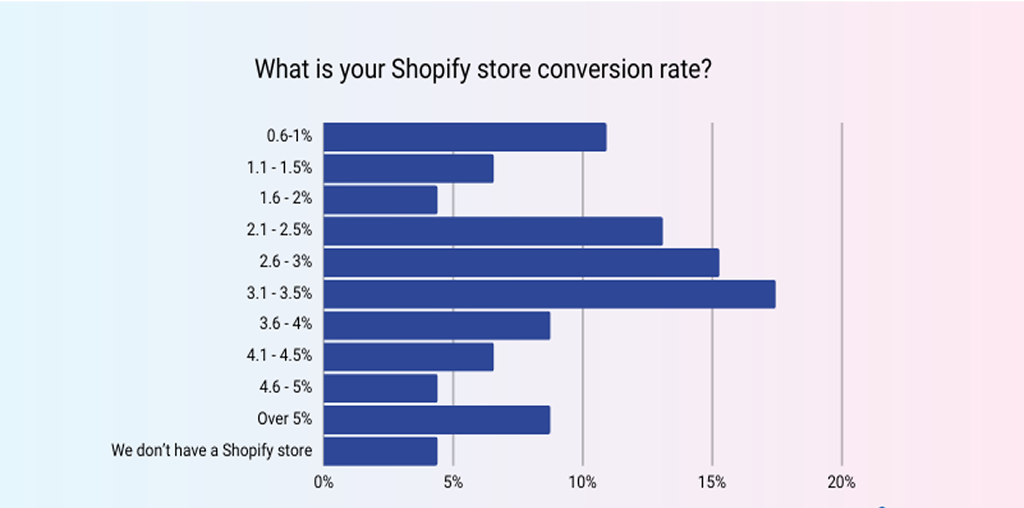
To improve your Shopify store conversion rate, focus on reducing customer hesitation and making every step from product discovery to checkout simple, fast, trustworthy, and mobile-friendly. The biggest opportunities usually come from improving product pages, website speed, navigation, checkout UX, trust signals, pricing clarity, and customer experience—then measuring the results in Shopify Analytics. A high-traffic Shopify store does not automatically generate high sales. Your goal is to turn more qualified visitors into customers without creating unnecessary friction.
What Is Shopify Conversion Rate?
Your Shopify conversion rate represents the percentage of website visitors who complete a desired action, most commonly purchasing a product.
A simple formula is:
Conversion Rate = Completed Purchases ÷ Website Sessions × 100
For example, if 10,000 sessions generate 200 orders, the purchase conversion rate is 2%.
However, don’t focus only on one number. Monitor the complete funnel:
Visitors → Product Views → Add to Cart → Checkout → Purchase
This helps you identify exactly where potential customers are being lost.
10 Ways to Improve Shopify Conversion Rate
1. Optimize Your Product Pages
Your product page should answer the customer’s buying questions quickly.
Include:
- Clear product title
- High-quality product images
- Product videos where useful
- Benefit-focused descriptions
- Price and offers
- Product variants
- Stock availability
- Delivery information
- Return/refund details
- Customer reviews
- Clear Add to Cart button
2. Improve Shopify Store Speed
A slow website can create friction before customers even see your products.
Improve Shopify website performance by:
- Compressing large images
- Using modern image formats
- Removing unnecessary apps
- Reducing excessive third-party scripts
- Limiting heavy animations
- Using a lightweight theme
- Optimizing mobile performance
3. Make Your Store Mobile-Friendly
A large portion of ecommerce browsing happens on smartphones, so your Shopify store should be designed for smaller screens first.
Check:
- Mobile navigation
- Product image sizing
- Button placement
- Font readability
- Sticky Add to Cart functionality
- Product filters
- Checkout usability
- Payment experience
4. Build Trust Before Asking for the Sale
Customers need confidence before entering payment information.
Add visible:
- Customer reviews
- Ratings
- Secure payment information
- Clear shipping policy
- Return/refund policy
- Contact information
- Business details
- Product guarantees, where genuinely applicable
- Relevant trust badges
5. Simplify the Shopify Checkout
Checkout should be focused and distraction-free.
Avoid unnecessary steps, confusing forms, unexpected charges, and forced account creation.
Baymard’s latest research reports that additional costs, delivery concerns, trust issues, account creation, and complicated checkout processes are among the reasons shoppers abandon purchases.
Make important information easy to understand:
Product + Price + Shipping + Taxes/Fees + Delivery + Payment
Where appropriate, provide guest checkout and convenient payment options.
6. Make Pricing and Shipping Transparent
Unexpected costs can stop a customer at the final stage.
Clearly communicate:
- Product price
- Discounts
- Shipping charges
- Free-shipping thresholds
- Taxes or applicable fees
- Estimated delivery time
Baymard’s 2026 research identifies additional costs as a leading reported reason for checkout abandonment.
The customer’s question should be:
“Can I afford this?”
—not—
“What extra cost will appear next?”
7. Use Reviews and Social Proof
Customer-generated content can reduce uncertainty.
Useful forms of social proof include:
- Verified reviews
- Customer photos
- Video testimonials
- Product ratings
- Case studies
- Frequently purchased products
8. Improve Your Calls-to-Action
Your primary CTA should be clear and easy to understand.
Examples:
- Add to Cart
- Buy Now
- Shop Now
- Get Yours Today
Avoid filling a product page with multiple competing CTAs.
Use clear visual hierarchy so customers immediately understand the next step.
9. Use Shopify Analytics and A/B Testing
Conversion optimization should be based on evidence rather than assumptions.
Track:
- Conversion rate
- Add-to-cart rate
- Checkout-start rate
- Checkout conversion
- Cart abandonment
- Average order value
- Revenue per visitor
- Returning customer rate
Think Like Your Customer
Before optimizing your Shopify website, ask:
“If I were buying this product for the first time, what could make me hesitate?”
Look for questions such as:
- Is this product right for me?
- Is the price justified?
- Can I trust this store?
- When will it arrive?
- What happens if I don't like it?
- Are there additional charges?
- Can I pay using my preferred method?
Do & Don't for Shopify Conversion Optimization
| Do | Don’t |
|---|---|
| Use clear product benefits | Use vague descriptions |
| Show shipping information early | Hide extra charges |
| Optimize for mobile | Design only for desktop |
| Use genuine reviews | Publish fake testimonials |
| Simplify checkout | Add unnecessary steps |
| Test changes with data | Change everything at once |
| Use clear CTAs | Overload pages with CTAs |
| Monitor funnel performance | Look only at traffic |
Expert Recommendation
Don’t try to increase conversion rate by adding more pop-ups, discounts, or urgency messages first. Start with the fundamentals: understand your analytics, identify the biggest funnel drop-off, review the page from the customer’s perspective, remove friction, and then test improvements.
Baymard’s extensive checkout research also demonstrates that checkout UX can create significant conversion opportunities, with its research indicating that large ecommerce sites can potentially achieve substantial conversion gains through checkout improvements.
How quitecoder.agency Can Help
Improving Shopify conversion rate requires more than changing button colors. quitecoder.agency can help businesses improve their Shopify store through:
- Shopify store design and development
- Conversion-focused UI/UX
- Product page optimization
- Shopify theme customization
- Mobile optimization
- Speed and performance improvements
- Shopify checkout optimization
- App and third-party integration
- SEO-friendly ecommerce structure
- Conversion-focused landing pages
- Analytics and CRO improvements
FAQs: Shopify Conversion Rate Optimization
1. What is a good Shopify conversion rate?
There is no single conversion rate that is ideal for every Shopify store. Performance varies by product category, traffic source, price, customer intent, geography, device, and business model. Compare your results against your own historical data and relevant industry benchmarks.
2. How can I increase my Shopify conversion rate quickly?
Start by improving your product pages, clarifying shipping and returns, simplifying checkout, improving mobile UX, adding genuine reviews, and fixing obvious usability issues.
3. Why is my Shopify store getting traffic but no sales?
Traffic does not guarantee purchase intent. Problems may include poor targeting, unclear product value, weak product pages, pricing concerns, low trust, slow performance, or checkout friction.
4. How important are product pages for Shopify conversion?
Product pages are critical because they help customers understand the product, evaluate its value, overcome doubts, and decide whether to purchase.
5. Does website speed affect Shopify sales?
Website performance can influence user experience and purchasing behavior. Improving loading performance can reduce friction, particularly on mobile devices.
6. How can I reduce Shopify cart abandonment?
Make costs transparent, communicate delivery information clearly, provide convenient checkout options, reduce unnecessary form complexity, support guest checkout where appropriate, and build trust throughout checkout.
7. Should I offer discounts to increase Shopify conversions?
Discounts can encourage purchases, but they should not be the first solution. Improve product value communication, trust, usability, and checkout experience before relying heavily on discounts.
8. How can I optimize my Shopify store for mobile conversions?
Use responsive design, readable typography, fast-loading images, easy navigation, prominent CTAs, simple product selection, and a smooth mobile checkout experience.
9. What Shopify metrics should I monitor for CRO?
Monitor conversion rate, sessions, product views, add-to-cart rate, checkout starts, checkout conversion, average order value, revenue, and returning customer behavior.
10. How often should I optimize my Shopify store?
CRO should be an ongoing process. Review analytics regularly, identify meaningful friction points, make evidence-based changes, and test important improvements rather than redesigning the entire store without data.


Recent blog